From Chaos to Clarity: Transforming NY State Inspector Workflow
Case Study
From Chaos to Clarity: Transforming NY State Inspector Workflow
A deep dive into user-centered design for government technology
Published June 21, 2025
All names and core product details have been changed slightly to maintain anonymity.
Walking Into the Problem
Fresh off a cross-country move from LA to Albany, I expected my new gig as lead developer to be straightforward: optimize an aging inspection app, maybe fix some performance issues. What I found was way more complex.
I was a team of one—no designers, no other developers, just me and a government iPad app that somehow made seasoned building inspectors feel like beginners. These were people who could spot code violations from across a room, but they were spending minutes hunting through dropdown menus for violations they could describe in seconds.
The disconnect was profound: the system was designed around data structure, not human workflow. It was like forcing a chef to cook by navigating a database instead of reaching for ingredients.
"I spend more time fighting with this thing than I do actually inspecting buildings. It's like it was designed by someone who's never done an inspection in their life." — Field Inspector, 15+ years experience
But here's what made this project fascinating: the inspectors had developed sophisticated workarounds that actually worked better than the intended workflow. My job wasn't to teach them a new system—it was to build a system that understood how they already worked.
My Role & Constraints
While my official title was Lead Developer, I functioned as the de facto Product Manager. I owned the entire product lifecycle, from conducting ethnographic user research and defining requirements to leading design, engineering, and stakeholder communication. With a $0 external budget, no design system, and no team beneath me, I quickly turned the situation into a design-engineering sprint—ideating, prototyping, and shipping the entire inspector workflow single-handedly.
Deadlines were fixed, standards were undefined, and I knew that whatever I built would set the bar for every internal tool that followed. In short: one person, zero dollars, mission-critical impact.
"The original app was a pain to use. I often had to switch between two or three other apps to make sure my data was saved and I was getting to the right place."
— Anonymous Inspector
The Challenge: When Technology Becomes the Enemy
"I spend more time fighting with this app than I do actually inspecting," Sarah told me during my second week of field research. (Name changed for privacy) She was a 15-year veteran inspector with an encyclopedic knowledge of her territory, but watching her use the existing application was like watching a master chef try to cook with a rubber spatula.
The problems weren't just inconveniences—they were systemic barriers that fundamentally broke the inspection workflow. After shadowing eight different inspectors across three counties and timing their interactions, two critical pain points emerged that were costing the agency thousands of hours annually.
1. The List of Doom
Imagine opening your email and finding 2,847 unread messages with identical subject lines, sorted only by timestamp. That's essentially what inspectors faced every morning. The application presented assignments as an endless, undifferentiated list of addresses sorted only by due date—no grouping, no geographic context, no visual hierarchy.
During my time in the field, I watched Inspector Mike spend nearly ten minutes scrolling through this list just to find three related assignments that were literally across the street from each other. (Observation from field research, week 1) The cognitive overhead was enormous: inspectors had to mentally parse addresses, remember geographic relationships, and constantly context-switch between abstract lists and real-world locations.
The effect of this was that inspectors would have to do significant amounts of prep work at their computers in order to figure out what they needed to do for the day. Inefficient routing directly increased operational costs through wasted fuel and overtime pay. Furthermore, skipped assignments delayed revenue collection from fines and increased the agency's risk exposure from uninspected violations.
60s+ Average time to locate a specific assignment
2. The Violation Code Lottery
"Is it 47.3.2 or 47.2.3? I always forget," muttered Inspector Janet as she flipped through a printed violation code manual while standing in a parking lot. (Field observation, week 3). Believe it or not we had a very interesting situation where the building we were using our demo actually had a significant structural violation much to the chagrin of the building manager who was with us.
Unfortunately the search in the app was so poor that they would simply open the PDF version of the code books, look up what they needed, hope they find it, before then coming back to the app which was very likely to have been killed off by the system due to extremely high memory usage, before finally opening up the ongoing inspection and recording the code. This scene played out dozens of times during my research—experienced professionals reduced to guessing because the system demanded perfect recall of hundreds, potentially of numerical codes.
The violation code system was a masterclass in hostile design. Codes were organized hierarchically (which made sense for legal structure) but presented as a flat, searchable list (which made no sense for human cognition). Searching for "electrical" might return 23 different codes, with no indication of which was most relevant to the specific violation being documented. But what made things even worse was that the search was designed to look for exact search strings in exact order which mean that if you missed a word in between a search term you would never find the correct code.
I documented inspectors using increasingly creative workarounds: taking photos of violation codes to reference later, maintaining personal cheat sheets, and even calling colleagues for code lookups. One inspector showed me a spreadsheet he'd created mapping common violations to their codes—essentially rebuilding the search functionality himself. (Personal productivity hack discovered during interviews)
The deeper problem wasn't just inefficiency—it was confidence erosion. Seasoned inspectors who could spot code violations from across a room were second-guessing themselves because they couldn't trust the tools to support their expertise.
The Compound Effect
These weren't just individual frustrations—they created a compound effect that fundamentally altered how inspectors approached their work. Instead of focusing on finding and documenting violations, they were spending significant mental energy on interface navigation and code memorization. The tools were actively undermining the expertise they were meant to support.
*Specific quotes and scenarios have been created to illustrate real patterns observed during user research while protecting individual privacy.
The Approach: Design Thinking Meets Reality
I always say, "Design is Art, applied to everything" — but in government work, it's also politics, budgets, and legacy systems applied to everything.
Walking into a bureaucratic environment with design thinking principles is like bringing a scalpel to a sledgehammer fight. Every assumption I had about user research, rapid prototyping, and iterative design had to be adapted for an organization where "that's how we've always done it" wasn't just a mindset—it was a survival strategy in a complex regulatory environment.
Instead of asking inspectors what they wanted (which typically yields responses like "make it faster" or "fewer clicks"), I focused obsessively on understanding why they behaved certain ways. This "behavioral archaeology" approach revealed complex, dynamic decision-making patterns that had evolved over years of real-world constraints. (Approach adapted from ethnographic research methods)
1. From Technical Requirements to User Needs
A key challenge was shifting the team's focus from a database-centric to a user-centric mindset. Our initial research was limited, focusing more on the data structure than the user workflow. To gain buy-in for a more user-focused direction, I had to demonstrate the value of deep user understanding. This evidence-based approach, including analyzing the existing codebase and interviewing former developers, successfully convinced leadership to invest in a more ambitious, user-focused direction.
2. Behavioral Pattern Analysis: Decoding the Expert Mind
One of the key values in UX is the idea of empathizing with your users. Through my research, both from developer interviews and with the inspectors, I quickly understood that they could use computers just fine and their problems truly were valid. In fact, part of what inspired my ultimate design system was their familiarity with other popular iOS apps. It was clear they needed a more familiar experience, not a dumbed down one.
3. Ruthless Prioritization: Defining the MVP
With limited time and resources, we had to be ruthless in our prioritization. We identified a dozen potential improvements but focused the beta on two core features: Map-Based Navigation and AI-Powered Search. Our hypothesis was that solving route planning and code lookup—the two biggest time sinks—would deliver over 80% of the potential value to users and the business. Other features, like offline report generation and photo management, were designated for a V2 release, demonstrating a clear roadmap and strategic focus.
4. Technical Feasibility & Stakeholder Buy-In
Unfortunately my design exploration had to end about as soon as it started because I was also in charge of providing the technical guidelines for the project. I knew that there were two main issues we needed to solve with this iteration of the project to make it successful and one of them was understanding and easily searching up assignments geo-spatially. For this my research led me to using an Apple Maps instance for familiarity combined with smart clustering algorithms that used color and text to let them quickly know what kinds of locations (overdue, soon, done) where in that block.
My second big feature proposal was to use vector embeddings to look up the codes quickly and efficiently. This did not go very well as it was a brand new direction for the entire team and would become the first foray into artificial intelligence. Combined with the additional restriction of having to be done entirely on-device, I was faced with an enormous challenge.
To convince the team of the efficacy, I built a demo using a simple but highly functional BERT model to quickly parse and vectorize all of the codes that they had access to on the iPad. At our first demo, my team was amazed at the efficacy of the vector embeddings, but the real delight came from the inspectors who were completely blown away.
The Solution: From Mental Models to Digital Reality
The solution wasn't about building a better version of what existed—it was about building something fundamentally different that matched how inspectors actually think and work. Instead of forcing spatial thinkers into linear interfaces, we created a system that embraced the inherent geography of inspection work.
The design process revealed two breakthrough insights that would shape every interaction: first, that inspectors naturally think in terms of geographic relationships and efficient routes; and second, that their expertise in identifying violations was being undermined by systems that required perfect recall of arbitrary numerical codes. Our solution addressed both of these fundamental mismatches.
1. Intelligent Map-Based Navigation: Thinking in Space, Not Lists
The first breakthrough was simple in concept but revolutionary in practice: replace the endless scrollable list with a map that showed assignments as they actually existed in the real world. This wasn't just a cosmetic change—it fundamentally shifted the interaction model from abstract data management to spatial problem-solving.
But maps aren't automatically better than lists—they can easily become cluttered, overwhelming interfaces that create new problems. The design challenge was creating a map interface that enhanced rather than complicated the inspection workflow. The solution involved careful attention to information hierarchy, visual design, and progressive disclosure.
The Psychology of Spatial Recognition
Humans evolved to navigate physical space, not digital lists. Research in cognitive psychology shows that spatial memory is one of our most robust cognitive systems—it's why you can remember the layout of your childhood home decades later, but struggle to recall a shopping list from yesterday.
By presenting assignments geographically, we tapped into inspectors' natural spatial processing abilities. Color-coding by due date and status created an immediate visual language that required no conscious translation.
Beyond the Obvious: The Gas Station Layer
One of the most appreciated features wasn't about inspections at all—it was the integration of state-contracted gas stations as a map layer. This solved a real daily problem that inspectors had been dealing with individually.
During field research, I noticed inspectors keeping handwritten lists of approved gas stations. By integrating this information directly into the route planning interface, we eliminated a constant source of friction and decision fatigue.
Interface Design: Balancing Information and Clarity
The interface design challenge was creating a system that could display complex information without overwhelming users. Drawing inspiration from Apple Maps and Google Earth, but optimized for the specific needs of inspection work, we developed a progressive disclosure system that revealed information contextually.
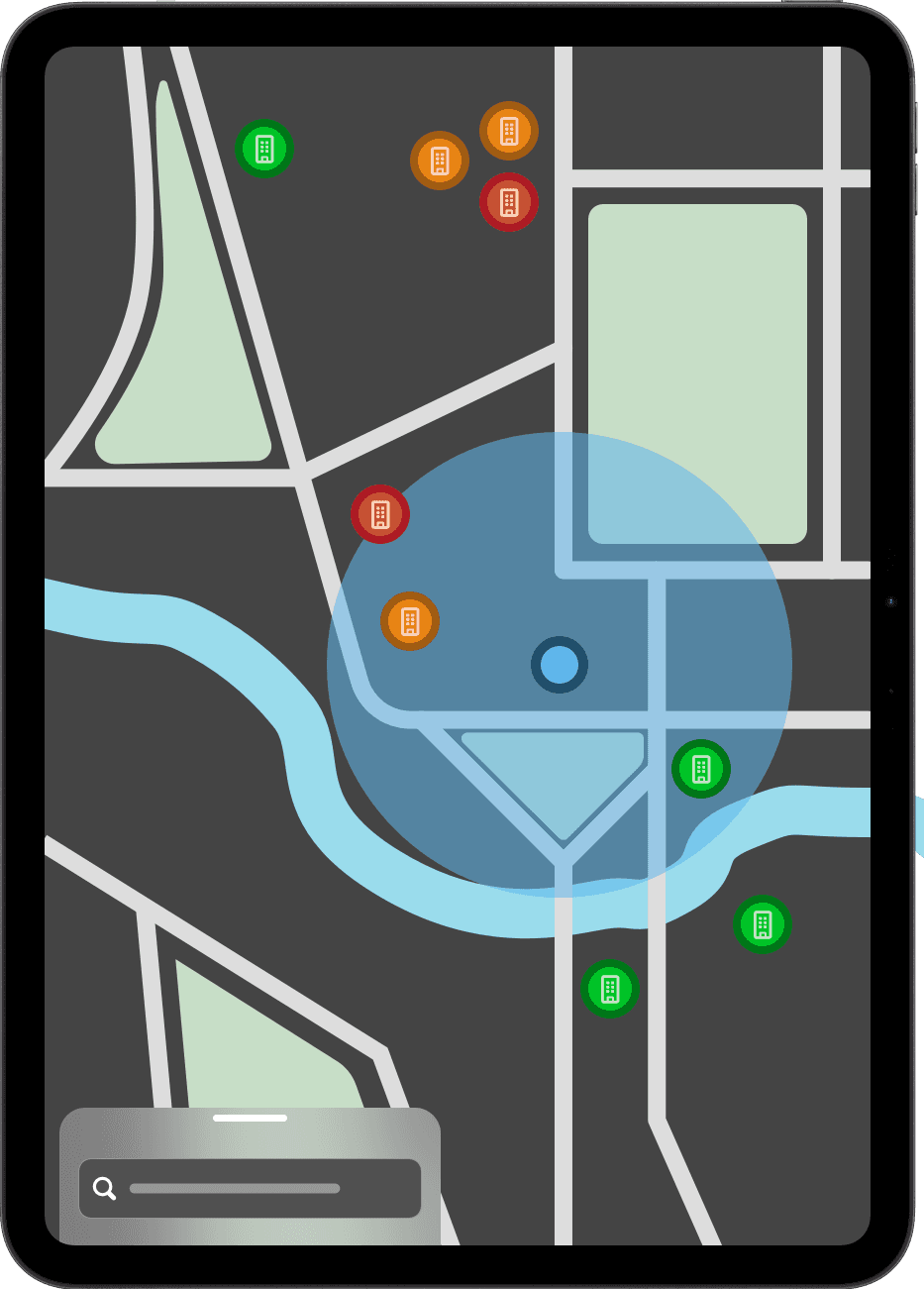
Map Overview: Maximum Context
The default view prioritizes geographic context. Inspectors can see assignment clusters, identify efficient routes, and spot geographic patterns at a glance.
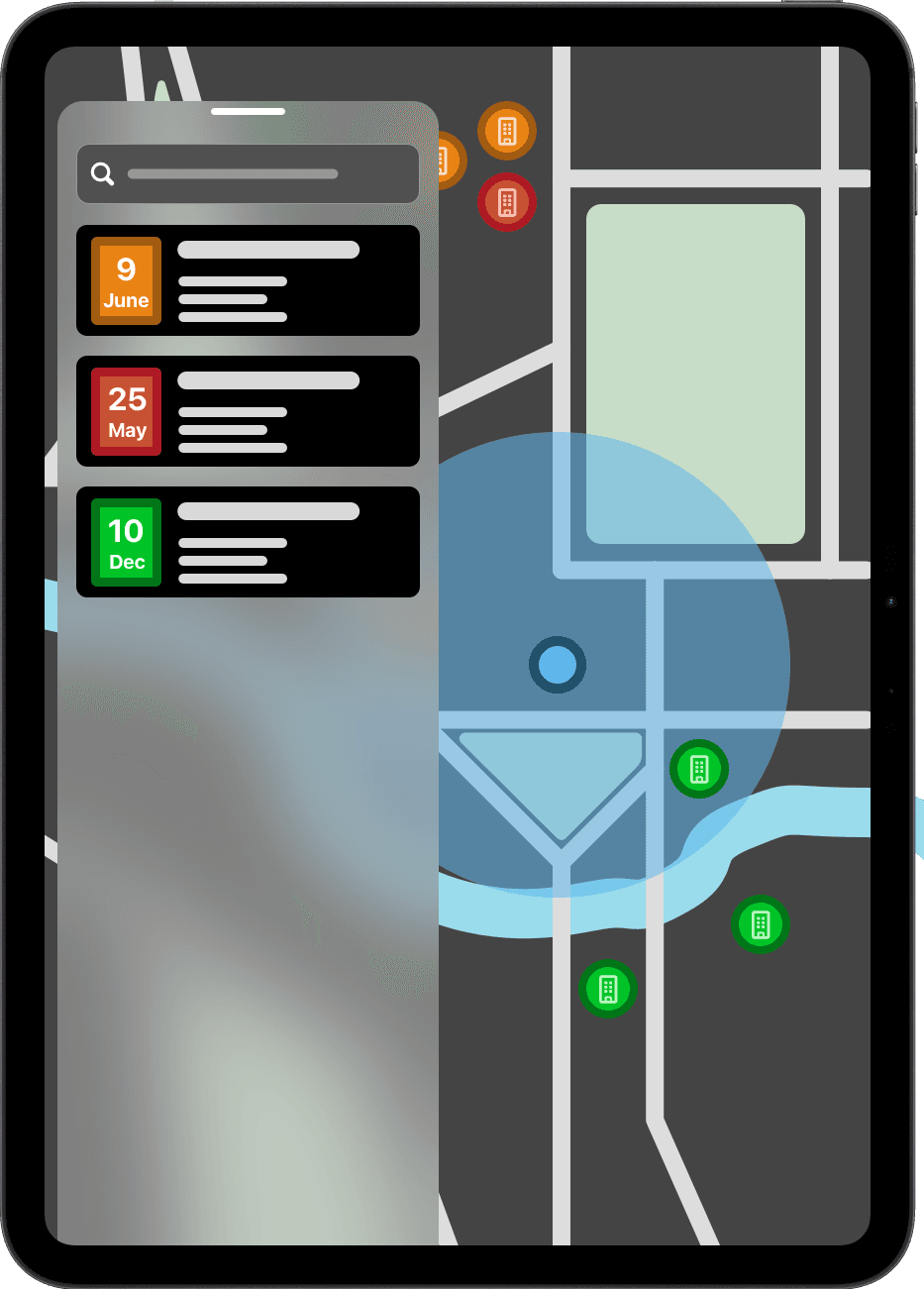
Detailed View: Context + Detail
When an assignment is selected, the sidebar expands to show comprehensive details while maintaining geographic context, preventing jarring context switches.
The Start of My Design System - This project also marked the start of my verticality focused design system that featured lots of modern glass effects and the idea of always adding on top rather than the standard practice of "replacing" screens or switching between tabs. This sense of permanence, especially with my later design projects, helped my designs becomes a gold standard for our apps moving forward because of how well it was received.
2. AI-Powered Code Search: When Natural Language Meets Legal Precision
The second innovation tackled the violation code problem through a fundamentally different approach: instead of requiring inspectors to learn the system's language, we taught the system to understand theirs. Using vector embeddings—the same technology that powers modern search engines and AI assistants—we created a violation code search that understood intent, not just keywords.
But implementing AI in a government context required careful consideration of explainability, reliability, and data privacy. The solution needed to be transparent about how matches were made, graceful when it made mistakes, and completely self-contained to meet security requirements. (Implementation constrained by government security protocols)
The Magic Behind Vector Embeddings
Vector embeddings transform words and phrases into numerical coordinates in high-dimensional space, where semantically similar concepts cluster together. Think of it as creating a map where "electrical hazard," "wiring problem," and "power safety" all end up in the same neighborhood, even though they share no common words.
This isn't keyword matching—it's meaning matching. The system understands that "the fire exit is blocked by empty boxes" relates to fire safety codes, even though it doesn't contain the word "fire" in the expected context.
AI Vector Search Demo
Type a natural language query to find violation codes
✨ Demo simulation - try the examples below for best results
Local Processing: Security Meets Performance
Government security requirements meant no cloud-based AI services. Instead, we implemented a lightweight embedding model that ran entirely on-device, ensuring both data privacy and functionality in areas with poor cellular coverage. The trade-off between model sophistication and local processing led to creative optimizations that actually improved response times compared to cloud-based alternatives.
Impact: From a Successful Beta to Organizational Change
While organizational budget shifts prevented a full production rollout, the high-fidelity beta was a resounding success in validating our core product hypotheses. The data collected proved the design's viability and directly influenced the agency's broader technology strategy. The most significant impacts were seen in validated efficiency gains and the creation of a new, user-centric development culture.
Task Discovery Speed
Primary efficiency metric
Code Search Accuracy
Quality improvement metric
1. Driving Cultural Change: A New Focus on UX
Perhaps the most significant impact was organizational. The project's success and the data-backed user feedback created a ripple effect, shifting how the entire agency approached technology projects. I successfully spearheaded the creation of a UX task force to advocate for user-centricity and accessibility, which had previously been an afterthought.
This initiative began our transition from a reactive, project-based lifecycle to a proactive, product-based system, breaking free of the boom-and-bust cycles that plagued other projects. By the time the project was sunset, my advocacy and the beta's success had laid the groundwork for a more strategic, user-focused product development culture. Having built our small UX working group and now having hired two new developers, I was ready to move towards a massive new transition to a product-based system, breaking free of the project-based lifecycle that plagued other projects. I was perfectly positioned to begin work on new projects, including building a new backend team from the ground up.
2. Validating the Business Case: Quantified Efficiency Gains
The beta provided the critical data to validate our business case. The reclamation of 45 minutes per inspector per day, when extrapolated across a larger team of 50+ inspectors, represented a potential 195+ hours of reclaimed productivity weekly—the equivalent of adding 4.8 full-time positions without any new hires.
The real impact wasn't just efficiency—it was effectiveness. Inspectors reported feeling more confident in their code selections, more strategic in their route planning, and more satisfied with their daily workflow. The technology stopped being an obstacle and became an amplifier of their expertise. While this specific app's rollout was halted, the validated design and a more robust documentation standard meant this successful model was quickly adapted for other, larger-scale inspection applications in the agency.
In Their Own Words: Inspector Feedback
"I've been doing inspections for eighteen years, and this is the first time I've actually looked forward to opening the work app. I can plan my whole day in five minutes instead of spending the first hour just figuring out where I'm going."
— Senior Inspector, Western Region (Name withheld for privacy)
"The AI search thing is like having a really smart partner who knows all the codes but doesn't make you feel stupid for asking. I type what I see, and it finds what I need."
— Field Inspector, Northern Region (Paraphrased from feedback session)
Key Takeaways: Lessons for Product Leadership
Every successful product project teaches lessons that extend far beyond its immediate scope. This inspector workflow transformation revealed insights about expert user behavior, AI integration strategy, organizational change management, and the relationship between constraints and innovation that have shaped how I approach product challenges.
These takeaways represent more than design principles or technical patterns—they're strategic insights about how product thinking can create value in complex, constraint-heavy environments where user experience has traditionally been an afterthought.
1. Mental Models Are the Real UX Challenge
Product Strategy
The biggest breakthroughs came from understanding how experts naturally think, not from applying standard UX patterns.
Government users aren't just different from consumer app users—they're domain experts with sophisticated mental models that have evolved over years of real-world constraints. The application succeeded not by teaching users to think differently, but by designing interfaces that matched their existing cognitive patterns. This required moving beyond personas and user journeys to deep ethnographic research and cognitive analysis.
Product Management Application: As a PM, the most valuable skill isn't knowing design patterns—it's developing the ability to decode expert workflows and translate professional intuition into product requirements. User research in B2B or specialized domains requires fundamentally different approaches than consumer product research, focusing on deep ethnography over broad surveys.
2. AI Amplifies Expertise, Doesn't Replace It
Technical Innovation
Vector embeddings worked because they supported human expertise rather than attempting to automate decision-making.
The temptation with AI integration is to automate complex decisions, but government users need transparency and control. Our AI implementation focused on translation and assistance—helping users express their expertise more efficiently rather than making decisions for them. The semantic search didn't choose violation codes; it helped inspectors find the codes they already knew they needed.
Product Management Application: Successful AI product integration often means designing intelligent assistants rather than automated decision-makers. As a PM, the goal is to ensure users understand why the AI suggests what it suggests, maintaining their sense of control and trust, especially in high-stakes domains. The most powerful AI features often feel invisible—they enhance human capability without creating dependency.
3. Design Success Creates Cultural Momentum
Organizational Change
One successful user-centered design project can transform organizational attitudes toward technology development.
The inspector application's success wasn't just measured in efficiency metrics—it shifted how the entire agency thought about software projects. Teams that had previously accepted poor user experience as inevitable began demanding better design from other technology initiatives. The project created internal advocates for design thinking who influenced budget decisions and project planning beyond our immediate scope.
Product Management Application: Product managers in large organizations aren't just building products—they're building organizational capacity for better product development. A successful project creates political capital and cultural momentum. As a PM, demonstrating the ROI from design investment is a critical tool for driving long-term organizational transformation and securing buy-in for future initiatives.
4. Constraints Fuel Creative Problem-Solving
Implementation Reality
Government security and budget constraints led to more innovative solutions than unlimited resources would have.
Working within strict security requirements (no cloud AI services) and zero external budget forced creative technical solutions that actually outperformed cloud alternatives. Local vector embedding processing was faster and more reliable than API-based solutions would have been. The constraints eliminated decision paralysis and forced focus on fundamental user needs rather than feature complexity.
Product Management Application: As a PM, I now view constraints not as blockers, but as a strategic tool to force focus. They lead to more elegant and efficient solutions by eliminating feature bloat. This project taught me to define and communicate 'anti-goals' (what we are not doing) as clearly as our primary objectives to keep the team aligned and focused on core value.
The Government Technology Opportunity
This project highlighted a massive opportunity in government technology: there are thousands of expert users working with poorly designed systems, creating inefficiencies that compound across entire organizations. The potential impact of good product management and design thinking in these environments is enormous, but it requires a fundamentally different approach than consumer product development.
Government users aren't "difficult" or "resistant to change"—they're professionals with deep domain expertise who have learned to work around bad tools. When you build something that actually supports their expertise, adoption happens organically and enthusiasm spreads throughout the organization. Though my original users never got to ultimately use the fruits of my labor, other inspectors in similar fields are able to utilize the new design system and have given similar glowing feedback.
The AI Integration Paradox
The most successful AI features often feel the least like "AI" to users. The vector embedding search didn't announce itself as artificial intelligence—it just worked the way users expected search to work, finding meaning rather than matching keywords. This suggests that the future of AI in professional tools isn't about flashy generative features, but about invisible intelligence that amplifies human expertise.
Product managers working with AI need to resist the temptation to showcase the technology and instead focus relentlessly on user outcomes. The best AI product features solve user problems so elegantly that users don't think about the underlying technology at all.
From Project Success to Career Direction
This project crystallized my understanding of what I want to do as a product manager: find complex domains where expert users are underserved by technology, and build products that amplify their professional capabilities. The work is challenging because it requires deep domain understanding, but the impact is tremendous because these users rarely receive this level of product attention.
The transition from building consumer products to building professional tools requires different skills—more ethnographic research, more systems thinking, more stakeholder management across complex organizations. But the opportunity to transform how people approach their professional work is incredibly compelling, especially in sectors where good product management can create massive social value.
Closing Thoughts
"Design is Art, Budgets are not"
This project exemplified my philosophy that great design starts with deep empathy, is enabled by technical understanding, and ultimately transforms how people interact with their most critical tools. The success wasn't just in the metrics—it was in creating a foundation for user-centered thinking that continues to influence every product decision the organization makes. My designs have always been opinionated and focused on emotion. Thankfully, I'm happy to see that my design was able to live on.
Thanks for reading!